Sales Dashboard

This article walks through each section of the Sales Dashboard, explains how the demo data behaves and shows how your clients can interpret the same cards and charts in their own live Helm environment

Understanding Your Sales Dashboard

The Sales Dashboard is your commercial amphitheatre, a single stage upon which orders, revenue and profitability all perform in synchrony, allowing you to see at a glance how well your E‑commerce operation is truly doing

Timeframe And Comparison

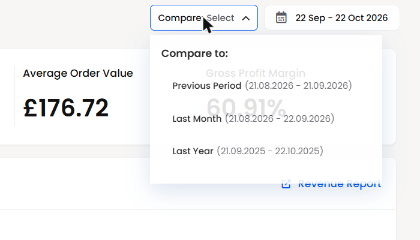
At the top of the dashboard you will see a date range selector, for example

“19 Feb – 19 Mar 2026”

This indicates the period for which all of the sales figures, charts and rankings are being calculated Every number you see on the page relates to this selected timeframe

Alongside the date range there is a “Compare” option This allows you to compare the current period against a previous period of the same length For instance you might compare the last 30 days against the 30 days before that, to see how your performance is trending over time

In the demo environment the focus is on 19 February to 19 March 2026, giving you a neat one‑month snapshot of sales behaviour

Headline Sales Metrics

Beneath the greeting banner you will find a set of headline metrics These provide an immediate sense of commercial performance for the selected period

Orders

“Orders” shows the total number of customer orders created in the selected timeframe

In the demo data this is Orders: 36

If this were your live account this would represent 36 distinct sales orders received across all connected channels during the chosen period A rising order count suggests increasing demand, while a falling count may prompt you to review pricing, marketing or product availability

Revenue

“Revenue” shows the total sales value of those orders for the timeframe

In the demo data this appears as Revenue: £9.42K

This means that the combined value of all 36 orders is £9,420 in the selected period In your own account this metric answers the most fundamental question of all – how much money did we take in sales

Products Sold

“Products Sold” represents the total quantity of individual items sold, across all orders and channels, during the period

In the demo data this is Products Sold: 66

This means that although there were 36 orders, some orders contained multiple items, giving a total of 66 units sold If you notice revenue increasing faster than products sold, it may indicate higher pricing or a richer product mix; if products sold rise but revenue does not, it might suggest discounting or a shift to lower‑value items

Average Order Value

“Average Order Value” (often abbreviated to AOV) shows the mean revenue per order for the period It is calculated simply as total revenue divided by the number of orders

In the demo dataset we see Average Order Value: £261.73

This tells you that, on average, each of the 36 orders in the period brought in approximately £262 In a live environment, you might seek to increase this number through up‑selling, bundles or minimum free‑shipping thresholds, as higher AOV can significantly improve profitability

Gross Profit Margin

“Gross Profit Margin” expresses, as a percentage, how much profit you retain after product costs are deducted, before overheads and operating expenses It is calculated from the relationship between revenue and cost of goods sold

In the demo data this is shown as Gross Profit Margin: 100%

This is deliberately exaggerated for demonstration purposes It indicates that in this demo configuration the system has no cost prices set for the products, so all revenue is treated as gross profit In a live system you would normally see a far lower, more realistic percentage, for example 30%, 45% or 60%

In your own account this metric is extremely valuable It reveals whether you are selling enough high‑margin products and whether discounting, shipping costs or supplier prices are eroding your profitability

Revenue Over Time

The “Revenue Over Time” chart visualises how your revenue and gross profit margin evolve day by day during the selected period It helps you see patterns rather than just a single total

The chart presents

  • A line for “Revenue” per day

  • A line or markers for “Gross Profit Margin” over time

  • Optional comparison lines for the “Previous Period”

In the demo data you will see a chart with dates along the horizontal axis from 20 February to 20 March and revenue values on the vertical axis However the summary underneath currently displays the Revenue & Gross Profit Margins = £0

This simply reflects that, for demonstration purposes, the detailed graph is not actively plotting values despite the headline cards showing aggregated numbers When connected to your real data, you would see each day’s revenue rising and falling, with the ability to visually compare this to the previous period’s performance

You can use this chart to

  • Identify peak sales days, such as marketing campaigns or seasonal events

  • Spot quieter intervals where additional promotion may be needed

  • Compare current performance with previous periods to see whether you are improving, declining or remaining stable

Sales By Channel

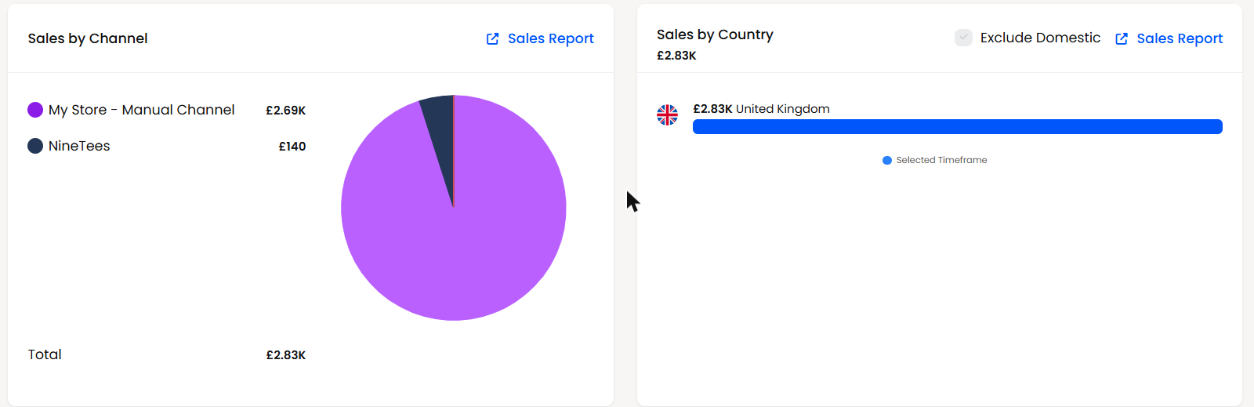
The “Sales by Channel” section breaks down your revenue by sales channel, helping you understand which sources of orders are truly driving your business forward

In the demo data the table shows

My Store – Manual Channel: £9.42K,
Total: £9.42K

This tells you that, in the demo period, all revenue has been attributed to a single channel called “My Store – Manual Channel” The “Total” confirms that this adds up to the same £9.42K you see in the headline revenue card

In a real Helm installation you might see multiple channels here, for example

  • Your main e‑commerce website

  • Marketplaces such as Amazon or eBay

  • Manual or phone orders

  • Additional web shops or regional storefronts

This section allows you to

  • See which channels are contributing the most revenue

  • Identify underperforming channels that may need optimisation

  • Evaluate the impact of new channels you have recently launched

You can click the linked “Sales Report” to drill into more detailed channel‑level reporting for the same period

Sales By Country

The “Sales by Country” panel shows where your customers are located, again for the selected timeframe The total revenue is broken down by country, allowing you to visualise your geographic spread

In the demo environment the panel shows a total of £9.42K, then lists

France – £26.14
Greece – £1.71K
United Kingdom – £7.69K

These three amounts collectively contribute to the overall revenue in the period, with the United Kingdom clearly dominating in this scenario

There is also an “Exclude Domestic” toggle which allows you to remove your home country from the chart and focus purely on export or international sales This is especially useful if your domestic market is very large, as it allows you to see more subtle growth in overseas regions without the home country overshadowing the graph

In a live account this section helps you

  • Understand which countries or regions are most lucrative

  • Identify emerging markets where small but growing revenue streams appear

  • Inform decisions on localisation, currency support, shipping services and tax registrations

You can again click through to the underlying Sales Report for deeper geographical analysis

Top 10 Products Revenue

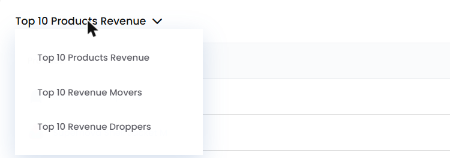
At the foot of the Sales Dashboard you will find the “Top 10 Products Revenue” table This is where we move from high‑level metrics into the realm of individual product heroes and supporting cast

The table shows, for the selected timeframe

  • Product name

  • Sales Quantity

  • Revenue generated

In the demo data the table is populated as follows

  • Cream and Yellow sofa – 7 units – £5.25K

  • Yellow Sofa – 3 units – £1.05K

  • Pink Armchair – 3 units – £660

  • Blue Silk Tuxedo – 2 units – £500

  • Cream Sofa – 1 unit – £450

  • Striped Silk Blouse – 5 units – £225

  • White Bed Clothes – 3 units – £135

  • Bedside Table – 2 units – £130

  • Bangle Bracelet – 5 units – £125

  • Woman Gold Necklace – 1 unit – £120

From this alone you can deduce several useful insights even in the demo environment

The “Cream and Yellow sofa” is your undisputed revenue champion, generating £5,250 from just seven units, making it both high value and reasonably popular The “Yellow Sofa” and “Cream Sofa” also feature strongly, suggesting that sofas in general are the backbone of this fictional business

Meanwhile, items like “Bangle Bracelet” and “Striped Silk Blouse” have lower revenue individually but appear in higher quantities, which in a real operation might indicate impulse or add‑on purchases that lift your average order value

In your own account your clients can use this section to

  • Identify their best‑selling products by revenue, not just by quantity

  • Spot high‑margin or high‑value items that warrant extra promotion or stock protection

  • Recognise under‑performing products that rarely make the top ten and may need to be discounted, re‑positioned or retired

Each product name is clickable, taking the user to the relevant product detail or inventory revenue report, allowing them to explore margin, stock and sales performance in much greater depth

Using The Sales Dashboard In Day‑To‑Day Trade

Although the demo environment uses charming sofas and sartorial delights to demonstrate the concept, the structure exactly mirrors what your clients will see in Helm with their own catalogue and orders

Once connected to their stores and channels, the Sales Dashboard becomes a daily command centre They can

  • Glance at orders, revenue, products sold and gross profit margin for the current period

  • Analyse sales patterns by day through the Revenue Over Time chart

  • Understand which channels and countries are doing the heavy lifting

  • Discover which products are truly driving revenue and which are merely loitering in the catalogue

Taken together, these metrics transform the Sales Dashboard from a simple collection of numbers into a sophisticated decision‑making instrument, guiding smarter merchandising, more intelligent marketing and more profitable stock management